Pressing the Export to iTunes... button shows the dialog below.
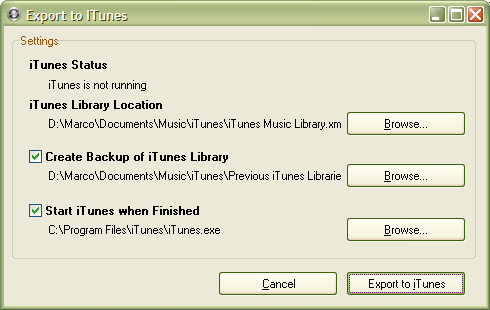
Export Settings
- iTunes Status: An export is not possible if iTunes is running. If the red "iTunes is running" message appears at the top of the dialog, simply shut down iTunes and wait a second or two for the "iTunes is not running" message to appear.
- iTunes Libray Location: The location to which TuneSync will write the merged library file. This is automatically set to the default iTunes library location -- you will not need to change it in most cases.
- Backup: TuneSync will back up your current iTunes library in case anything goes wrong. The backup location again defaults to the backup folder that iTunes uses when it upgrades itself to a new version. If the export succeeds, feel free to navigate to the folder and delete old backups that you no longer want.
- Start iTunes: Once the new library is written, iTunes must be started in order to complete the process. TuneSync will launch iTunes automatically from the indicated location in order to do this immediately (instead of the next time iTunes starts, when the occasionally long import process may be a surprise). Once iTunes starts, it will complain that its library is corrupted. Tell it that it may import from its backup (which is the file TuneSync just wrote) and it will reload itself from that file instead.
- See also:
- Import from iTunes by Hand
Exporting Libraries