You can use the song info pane to synchronize individual parts of one or more songs (see selecting multiple songs for tips on working with more than one song). Any values that are marked purple or red can be synchronized to use the value from one library or another. Values marked blue have already been modified (and those in gray have been discarded); these can either be reverted or synchronized in the other direction.
Right-click a value to bring up the following popup menu:
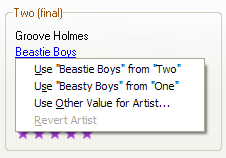
Song Info Pane Popup Menu
The basic commands available from this menu are:
- Use Library Value: The first two entries let you select whether to use the value from one library or the other. These entries are disabled if both values are the same.
- Use Other Value: You can also edit any value, replacing the value in both libraries with a new value of your own choosing. You can always execute this operation, even when both values are the same or if a song is not even matched.
- Revert Value: Revert any changes made to this value in both songs to the original values loaded with the iTunes libraries. This operation is only enabled if changes have been made.
You can also execute the operations listed above simply by clicking on a value like Artist or Rating. The following shortcuts are supported:
Left-Click: Click any value to apply that value to both libraries.Ctrl+Left-Click: Control-click a value to open the Edit Window.Shift+Left-Click: Shift-click a value to revert it to the original values for both libraries.
All of these operations also work with multiple song selections.
- See also:
- Song Info Pane
Selecting Multiple Songs