This is part four of the Tutorial.
Make sure you're on the Matches View and looking at the five songs from the previous step. All song data has been synchronized and you should see only purple and blue text, indicated data that has been modifed and user data that differs, respectively.
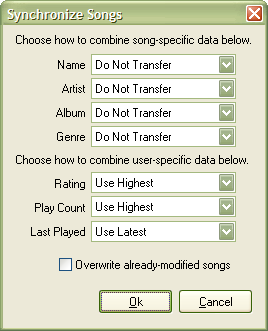
- Press Synchronize All... from the popup menu or toolbar; TuneSync shows the Synchronize Window, shown below:
- Set Name, Artist, Album and Genre to Do Not Transfer (since they are already synchronized). Set Rating and Play Count to Use Highest and Last Played to Use Latest.*
- Press Ok to synchronize the selected data for all songs in the view.
Your data is now completely synchronized and you're ready to check it.
- See also:
- Prev: Using the Popup Menu
Next: Checking Songs