
LinkedIn is blackmailing me for more personal data
Published by marco on
LinkedIn is an enshittified dumpster fire.
tl;dr: LinkedIn has blocked my account, ostensibly to protect me and they are trying to blackmail me into giving me a copy of my government-issued identify. They don’t have a support email. Don’t look for me on LinkedIn anytime soon.
I recently set up 2FA for my LinkedIn account. Then I changed the email address associated with that account because the old one was an ancient throwaway that I’m phasing out. Not long after, LinkedIn blocked my account, ordering me to provide a real-world physical proof of identity in order to get back in to my account.
 LinkedIn has blocked my account as a precaution
“We take proactive steps to secure your account when we detect potential unauthorized access. Signs that your account may have been compromised
include account access from unfamiliar locations or devices, or unusual activities such as multiple attempts to change passwords or critical settings.”
I was trying to make my account more secure and they considered that suspicious. Even weeks later, after no-one has done anything further with the account, they’re not freeing it back up. So my account on LinkedIn is stranded, encysted in the past. No big loss, really. It was very useful when I was looking for a job; I honestly hope I won’t need it for that again.
“To help you keep your account safe and regain access, we’ll first need to confirm you’re the valid account owner. Please submit a government-issued
ID to start the process.”
I haven’t been on LinkedIn for weeks now because I am not giving a social-media site a picture of a government-issued identity.
“A customer support representative will contact you within 48 hours with more information about your account and the status of restoring your access.”
This has never happened. They certainly didn’t send a mail to the account associated with my LinkedIn account. Below you can see the most recent messages from LinkedIn to that account.
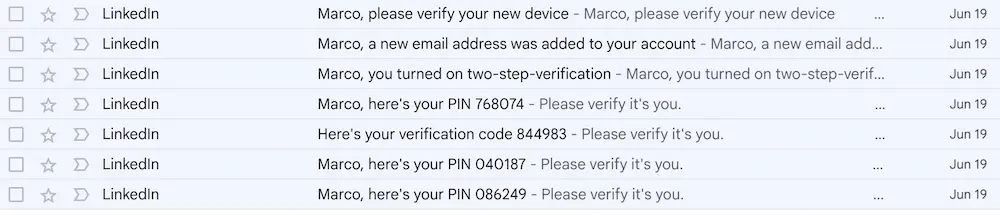 Successfully configured 2FA and a new email address for LinkedIn
I tried again this morning and was still blocked in the same way.
So, I checked what my options are. The Verify your identity to recover account access page gives several options, each of which involves the LinkedIn organization not being satisfied with my password and not even trying 2FA (you know, to see if I would be able to respond to that) because they apparently don’t trust their own security mechanisms.
Your options for recovery are:
- Recover your account using a government issued ID
- Verify your identity with something called “Persona”, which I’m sure is a third-party identity-management company that totally doesn’t sell your data to all comers.
- Other ways to recover your account
- Through an Affidavit of Identity “sign[ed] before a Notary Public” (like, who the f@&k do you think you are?)
- Through a work email address
I would be interested in the last option but no-one has contacted me and that option is not available through the web site—probably because most people would just use that option instead of uploading a picture of their most precious form of identity to a social-media site with delusions of grandeur.
So, I went to Contact LinkedIn customer support
 Step one to get support for not being able to log in: LOG IN
Near the bottom of the page, they have a “tip” that reads “If your account is blocked or restricted, learn more about account restrictions.”.
 Here's a tip − go f@&k yourself
That link takes me back to a page that tells me that the only way to reinstate an account that has been blocked for “identity violations” is to verify your identity as outlined above.
“Our Professional Community Policies require members to use their true identity on LinkedIn, provide accurate information about themselves or their organization, and only share information that is real and authentic. If we find that your profile or parts of your profile are intentionally fraudulent or do not reflect your true identity, we may place a restriction on your account. Depending on the type of violation, access to your account may be restricted either temporarily or indefinitely. If you believe your account was restricted in error, please login and follow the onscreen steps to verify your identity.”
OMG really? Because then you’d have to ban most of your users because everyone lies their face off on LinkedIn all of the time.
“Additionally, if we find signs that your account has been compromised or taken over by another person or entity, we may take proactive measures to restrict your account to protect your information. To regain access to your account, please login and follow the steps on screen to verify your identity.”
I guess this is what happened but it’s only because LinkedIn has implemented a least-common-denominator approach to support and moderation because they know that they can just cheerily demand that their users do a bunch of extra work[1] in order to partake in their vibrant community of liars and bots.
No. You guys f@&cked up. I have a list of mails above that show how happily you allowed me to set up 2FA and change and confirm my email address. If you consider that to be suspicious activity then kiss my ass.
I’m still waiting for that promised contact from LinkedIn. Until then, I guess I’ll have to live without that flood of increasingly AI-generated content.
[1] I don’t think it’s ironic that I’m doing a lot of work writing an article about this. I enjoy writing articles on my own blog, especially when it’s this easy and fun to talk about the way that the monopolies preferred by our economic and social system try to turn its customers—no, I don’t pay for LinkedIn—into unpaid workers (slaves?).↩