TuneSync can match songs in many different ways, allowing for slight to massive differences between libraries. This makes it possible to change a Genre or Album name or fix the capitalization or spelling of a song title and still easily pick up a match in the other library.
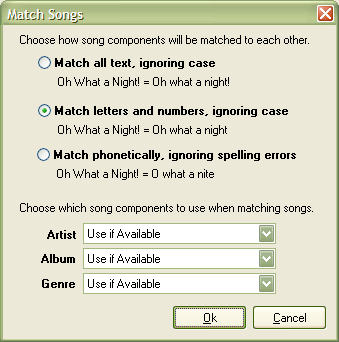
Match Songs
First, you select how the parts of the song will be matched against each other, from strictest to most relaxed:
- Match all text, ignoring case: Compares all text without regard to case. Does not exclude any characters or do any "fuzzy" matching.
- Match letters and numbers, ignoring case: Remove all non-alphanumeric characters before comparing text. This matches a song even if there are differences in punctuation or spacing.
- Match phonetically, ignoring spelling errors: The same as above, but uses a phonetic representation to make a match even if there are non-phonetic spelling errors (e.g. "receive" vs. "recieve").
Next, you choose which parts of the song -- in addition to the title -- TuneSync should use to match a song, again, from strictest to most relaxed:
- Must Match: Both songs must match according to the rule selected above.
- Use if Available: Prefer a match with the part selected, but allow a match if the part is missing in the other library. For example, this allows a match if one of the libraries has added a Genre or Album.
- Do Not Use: Ignore the given component in all cases.
If you know that your two libraries are pretty "close" statistically or TuneSync, you'll do just fine with the default settings, which match only number and letters, with all parts of a song save the name optional. See below if your libraries are "farther apart" or very different.
When the match is complete, TuneSync shows the Match Results Window with the results.
If TuneSync is making strange matches, you're better off undoing the default match (by reloading the libraries) and using stricter match options. For example, if both libraries have a lot of songs, but relatively little overlap (say only 50%), the odds are high that there are different songs with the same title. The most relaxed options, will, in this case, match those two songs. If you're not careful, you may accept this match and synchronize the Rating by accident.
In this case, it's best to do two matches: one using stricter options (e.g. with Artist set to Must Match) where you can be less careful about accepting those matches, and one using the default options, to pick up any remaining potential matches (e.g. where the Artist may have changed).
Though, in the end, you're making the same default match, it's applied to a much smaller subset of songs, which generates a much smaller list of songs that you should examine carefully.
- See also:
- Matching Songs
Match Results Window